KleenMic
Quick answer
Ask who hears the echo, try headphones and disconnect audio on extra devices in the room. If only you hear your microphone twice, check monitoring. If a direct recording sounds hollow even without a call, investigate room reflections. These problems need different fixes; microphone noise suppression is not a universal echo repair.
Which sound are you calling echo?
Swipe sideways to see every column.
| Symptom | A useful first check |
|---|---|
| You hear your own words return after speaking | Ask whether another participant’s speakers are feeding your voice into their microphone |
| Others hear themselves when your microphone is open | Try headphones on your Mac and check nearby devices joined to the call |
| Your voice has an empty-room tail | Listen to a direct recording and compare microphone distance |
| Only you hear two copies in your headphones | Check direct and software microphone monitoring |
| A loud ring or rising howl starts | Lower playback volume and break the speaker-to-microphone loop |
A call can contain several paths. Note what changes when you mute, use headphones or disconnect a device, changing one control at a time.
Try headphones and ask the other person to listen
A speaker can play the other person’s voice back into your microphone. That returned sound travels through the call again. Headphones are a useful check because they change the loudspeaker path while leaving the conversation connected.
Google Meet’s echo guidance recommends headphones and lower speaker volume, and describes its troubleshooting notification. Ask the other person whether the echo changes when you make that one adjustment.
If they hear themselves but you hear no problem, your local playback path is worth checking. If you hear your own voice returning, ask them to do the equivalent test. A microphone filter on your Mac cannot change how their speakers and microphone are arranged.
Disconnect audio on the second device
Check for a phone, second laptop or conference-room device joined nearby. One device might be muted but still playing meeting audio through its speaker. That sound can reach the microphone of the device you are actually using.
Zoom’s echo instructions distinguish this from a simple mute problem: disconnect the unnecessary audio connection. If you deliberately joined by phone for sound and by computer for video, keep only the intended audio route active.
For a private two-device check, wear headphones on the listening device and avoid placing an open speaker beside the speaking microphone. Otherwise the test can create the loop you are trying to diagnose.
Check whether the room is in the recording
Room reverberation is the lingering sound of your voice reflecting around the space. It can make speech feel distant or hollow. It is different from receiving another distinct copy of a sentence over a call.
Make a brief direct recording with headphones on and no meeting connected. Speak a sentence, pause, then listen back. If the same hollow tail is present, compare a closer microphone position or a more furnished part of the room. Keep the speaking volume steady so the comparison is useful.
Products that advertise acoustic echo cancellation and room dereverberation may handle them as separate features. Krisp’s documentation makes that distinction explicit. Do not infer room-reverb removal merely because an app has an echo-control switch.
If only you hear yourself twice, check monitoring
Some USB microphones let you hear the physical input directly through their headphone socket. A recording app can also send a monitored copy to the output. With both active, you may hear a direct voice and a delayed second copy.
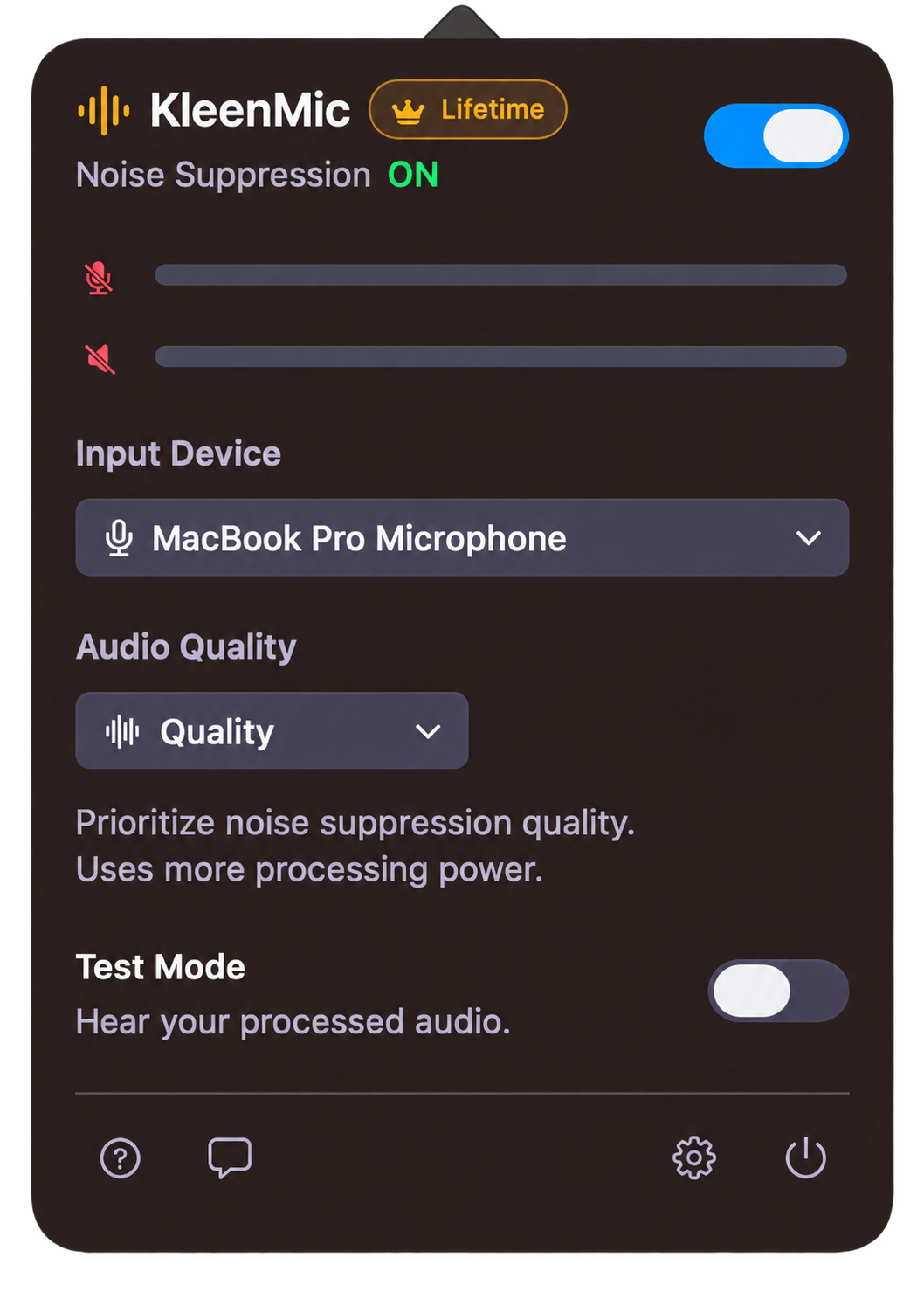
Check one monitoring path at a time. In KleenMic, Test Mode is for listening to the processed microphone through headphones; switch it off after the check. If a recorder is also monitoring its input, pause that monitoring while you identify the source.
Ask the other participant whether they hear the duplication too. A problem confined to your headphones should not be treated as proof that the meeting is receiving duplicate sound. The microphone troubleshooting guide helps follow the input through each app.
Where KleenMic fits in the check
KleenMic provides microphone noise removal and echo control on Apple Silicon Macs running macOS 14 or later. To try its microphone route, choose the physical input inside KleenMic and select KleenMic Microphone in the calling app. Keep the physical input, playback device and speaker volume noted when comparing settings.
Evaluate the actual symptom in a private call, including moments when both people speak. A quiet pause alone is not enough to judge whether useful speech survives. This guide does not claim measured echo reduction for your speakers or room, or promise that KleenMic fixes a loop originating on someone else’s computer.
The 72-hour trial needs no card or account. Keeping processing enabled afterward is an optional $20 one-time purchase for one Mac. Trial launches need internet; paid access needs verification at least every 30 days.
Keep the change that actually removed the symptom
Repeat a conversation with the same devices. Confirm that first words and simultaneous speech remain understandable. Note the microphone and playback output, and recheck them after reconnecting a dock or headset.
If headphones or removing a second audio connection solves the problem, keep that fix. For remaining typing or fan noise, use the background-noise checks.
Common questions
Why do other people hear an echo but I do not?
Your speakers or another nearby device may return their voice into your microphone. Try headphones and disconnect extra audio connections, then ask the listener whether it changes.
Is muting a second laptop enough?
Not always. A muted microphone can leave that laptop’s speakers active. Disconnect its meeting audio if another device is providing sound for the room.
Are echo cancellation and noise suppression the same?
No. Background-noise reduction, speaker playback echo and room reverberation are different problems. Check what a particular feature documents and test the symptom you have.
Can KleenMic fix echo from another participant’s computer?
A local microphone filter cannot change their physical setup or directly clean their incoming signal. Ask them to check speakers, headphones and duplicate audio connections too.
Sources and current details
Details reviewed on 22 October 2026. Older interface examples are dated in their captions. App menus and plan details can change.