KleenMic
Quick answer
Open Discord User Settings → Voice & Video, choose the intended input and find Noise Suppression. Discord includes Krisp for free. Compare it with your direct microphone before adding a separate filter, and check voice-activity sensitivity if the beginning of words is missing.
Select the microphone you actually use
Open User Settings → Voice & Video and inspect Input Device. A Mac may offer its built-in mic, a display, a headset, a USB interface and virtual devices. Select a specific input while troubleshooting so an automatic device change is easier to spot.
Speak close to the intended microphone at your usual level and use the available mic test. Keep your headphones selected for Output Device. Wearing headphones does not prove Discord uses their microphone; input and output are separate selections.
If the intended input is missing or silent in every app, follow the Mac microphone checklist first. A suppression setting cannot help a mic that Discord never receives.
Try Discord’s included noise suppression
In Voice & Video, find Noise Suppression and select Krisp. Discord also documents a suppression control available while connected to a voice channel. The exact placement can change with the client.
There is no separate Krisp purchase required for this built-in Discord feature. It filters the sound sent from your side; enabling it does not remove the noise coming from your friends’ microphones.
Use it as a first comparison, rather than assume another app is necessary. If your friends can understand every word and the room noise is no longer distracting, keep that simpler setup. Discord itself notes that filtering can reduce voice quality in an already quiet room with a good microphone.
Make a useful two-person sound check
- Use headphones at both ends of a private call.
- Say one sentence at normal volume with your hands away from the keyboard.
- Pause, then start a quieter sentence.
- Repeat the normal sentence while typing.
- Compare the direct mic and Discord’s suppression without changing position or gain.
Ask the listener which words disappear, if any, before asking how quiet the background is. Keyboard sound during speech is more revealing than a typing-only clip. A gate can make pauses quiet while allowing typing through whenever your voice opens the signal.
Keep this test short and repeatable. For a recurring keyboard problem, use the microphone-placement and vibration checks in our keyboard-noise guide.
If Discord cuts off words or sounds robotic
First check Input Mode. With Voice Activity, inspect its sensitivity control while speaking at a comfortable quiet level. With Push to Talk, make sure the key is held before the first word. These checks address whether audio is sent at all; they are separate from removing noise.
Then compare one processing layer at a time. If you have macOS Voice Isolation or a dedicated virtual microphone active, do not assume adding Discord’s strongest available filtering will improve it. Use the quiet-word diagnostic to separate a gate, suppression and level changes.
If only the call breaks up while local input is intact, investigate the connection and current Discord status too. Distortion from an overloaded microphone or an interface problem needs a different fix from acoustic keyboard noise.
If Krisp keeps turning off
Discord documents that very high CPU usage can make its integrated Krisp turn off to preserve voice performance. Its notification is a reason to check current workload, rather than repeatedly enable the same setting.
Pause an unnecessary heavy task and repeat the call test. Compare a quieter room or more suitable mic position as well. Installing another processor is not automatically a remedy for a busy Mac, and this guide does not claim a measured performance advantage for KleenMic.
Compare a dedicated virtual microphone
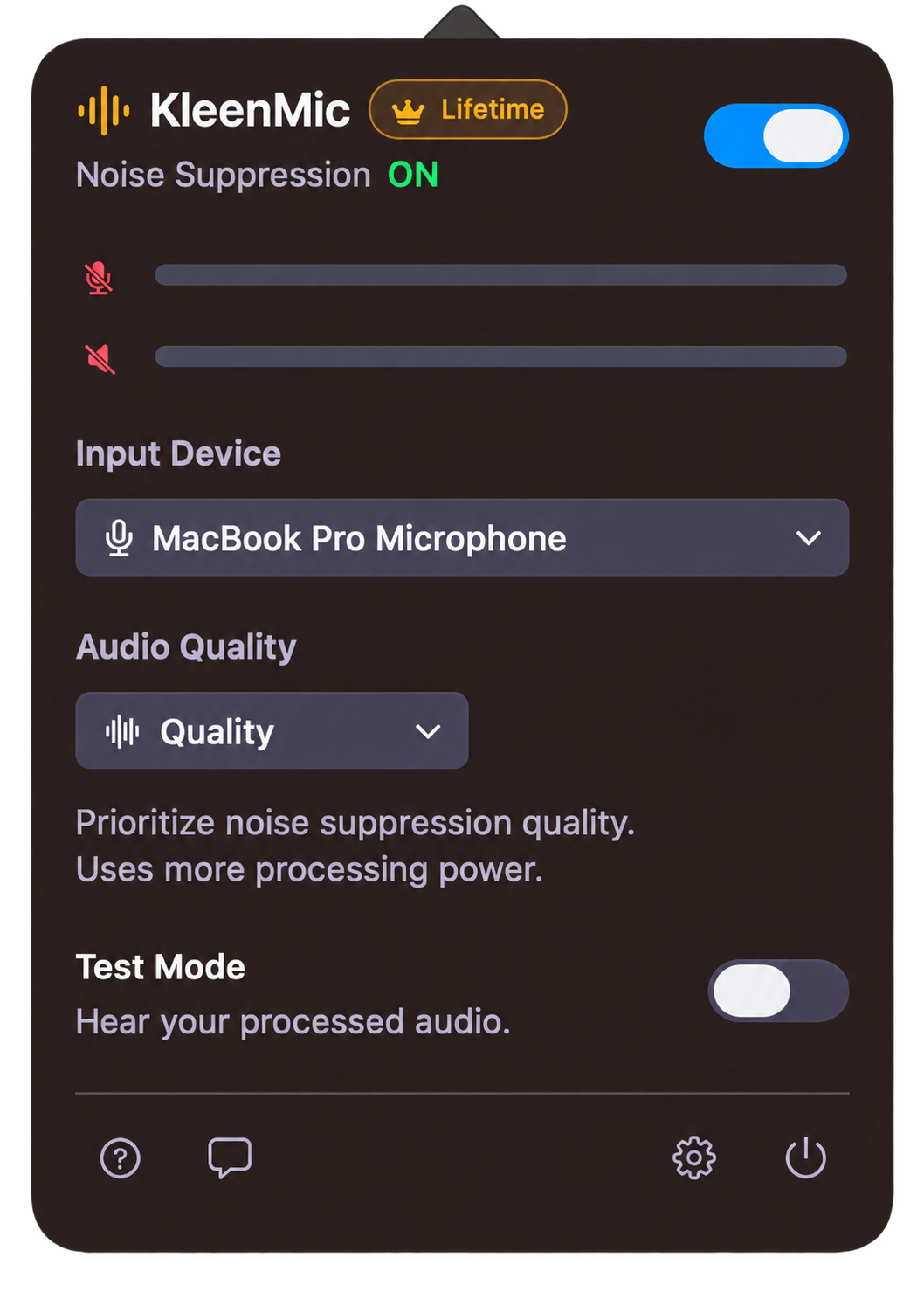
If you want the same microphone-filter setup across Discord and your work apps, you can evaluate a dedicated virtual input. KleenMic is one option for Apple Silicon Macs running macOS 14 or later.
- Install and open KleenMic, then choose your physical microphone inside it.
- Enable noise removal. Use headphones if checking live Test Mode, then switch Test Mode off.
- In Discord Voice & Video, choose KleenMic Microphone as Input Device.
- Keep your normal headphones as the output.
- Compare KleenMic by itself with Discord’s built-in option using the same phrases.
These steps describe the input route; verify the result in your current client and private call. KleenMic filters your outgoing microphone. It does not clean friends’ audio, add voice effects or repair a malfunctioning interface. The setup guide covers the virtual input in detail.
Keep interface issues and buying decisions separate
Discord has a separate support article about audio-interface issues on macOS. If the problem appears only with an interface, follow that advice and the manufacturer’s current guidance. Comparing another input or browser is a diagnostic step, not a guaranteed workaround.
Only pay for an additional filter after hearing a useful improvement. KleenMic offers a 72-hour trial without a card or account, followed by an optional $20 one-time license for one Mac. Trial launches require internet; paid access needs verification at least every 30 days. If Discord’s free controls already solve the problem, there is no need to change them.
Common questions
Is Krisp free inside Discord on Mac?
Discord says its integrated Krisp noise suppression is free. That is separate from buying a standalone Krisp plan for other applications.
Will enabling suppression clean up my friends’ background noise?
No. Discord’s integrated suppression filters your outgoing microphone. Each person’s audio setup remains separate.
Why does Discord sound worse with suppression in a quiet room?
Discord acknowledges that filtering can reduce voice quality when little noise needs removing. Compare with suppression off and keep the clearer result.
Can KleenMic replace Discord voice-activity or Push to Talk controls?
No. Those controls decide when Discord sends your signal. KleenMic filters the microphone audio supplied to Discord; it does not control your transmission key or threshold.
Sources and current details
Details reviewed on 22 October 2026. Older interface examples are dated in their captions. App menus and plan details can change.